

1 Run lifecycle
Queueing an oligo does not synthesize it. Something has to start the run, and then answer the machine as it works, because a synthesis is not one long automatic operation — it stops repeatedly and waits for a person.
You can leave all of that to whoever is at the Kilobaser and stop reading here. This chapter is for integrations that drive the machine themselves.
1.1 The shape of it
A client that drives runs is a loop, not a sequence of calls:
start the first entry in the queue
repeat:
    wait until the machine is at a checkpoint
    answer the question it is asking
until the run is finished
That is genuinely all of it. The difficulty is not the loop, it is that the client has to hold state — which run it started, what the machine last asked, whether it has already answered — so it needs the live mirror from live state rather than one-shot requests.
1.2 Only the front of the queue can start
curl --insecure -b cookies.txt \
  -X POST https://kilobaser.lab.example.org/api/processRuns \
  -H 'Content-Type: application/json' \
  -d '{"id": "2026-08-09T22:05:25Z-0be17442"}'
The id must be the first entry in the queue. Anything else fails:
| Code | Meaning |
|---|---|
1-1-9 |
ProcessRun is not first in queue |
1-1-8 |
something is already running |
There is no "run this one next" call. To run something sooner, move it to the front by
changing its priority (see queue oligos) and then start it. In practice
a driver starts the head, and the running order is decided when things are queued.
1.3 What actually runs
The entry you started is usually not the only thing that happens. The machine expands it
into whatever is needed to reach it, and processTypes on the queue entry tells you what
that will be:
insertChip -> cartridgeInit -> cartridgeActivate -> initializeSystem -> insertChip -> synthesis
Each of those is a process of its own with its own checkpoints, and currentProcessRunId
changes as the machine moves between them. A driver must keep answering across those
transitions rather than stopping when the id it started is no longer current.
1.4 Checkpoints
A checkpoint is the machine stopping to wait for a person. You can see one in the status:
{
  "currentState": { "mode": "check" },
  "pendingAnswers": ["placeholderInsertConfirmed"],
  "currentProcessRunId": "2026-08-09T22:05:25Z-0be17442"
}
Both parts matter. mode is check and pendingAnswers is non-empty; treat either
alone as the signal and you will answer too early.
Answer with the id the machine offered:
curl --insecure -b cookies.txt \
  -X PUT https://kilobaser.lab.example.org/api/processRuns/2026-08-09T22:05:25Z-0be17442/control \
  -H 'Content-Type: application/json' \
  -d '{"answers": {"placeholderInsertConfirmed": "true"}}'
The value is the string "true", not a boolean. Anything else is rejected with
2-12-2.
Send one answer, then wait for it to leave pendingAnswers before sending the next.
Answering a question the machine is no longer asking is an error, and the machine can
withdraw a question — so re-read the pending list on every event instead of remembering
what it was.
1.5 What the questions mean
Most checkpoints correspond to something physical. Answering them over the network does not perform the action, it asserts that the action has been performed.
| Answer | The machine is waiting for someone to |
|---|---|
confirmReadyToOpenLid |
stand clear so the lid can open |
lidClosed |
confirm nothing is obstructing the lid, so it can close |
chipInsertConfirmed |
put in a fresh chip and a fresh collection vial |
placeholderInsertConfirmed |
put in the black placeholder chip |
cartridgeInserted, cartridgeInsertConfirmed |
insert the cartridge |
confirmReadyForCartridgeDown |
stand clear of the cartridge mechanism |
cleaningVialInsertConfirmed |
place the cleaning vial |
flowOK |
confirm the flow looks right |
amountOK |
confirm the dispensed amount looks right |
confirmEndProcess |
end the run; the lid opens so the vial and used chip can come out and the placeholder chip goes in |
skipRemoveAndStartNextRun |
go straight to the next run without the full end-of-run sequence |
cancelProcess |
confirm a cancellation |
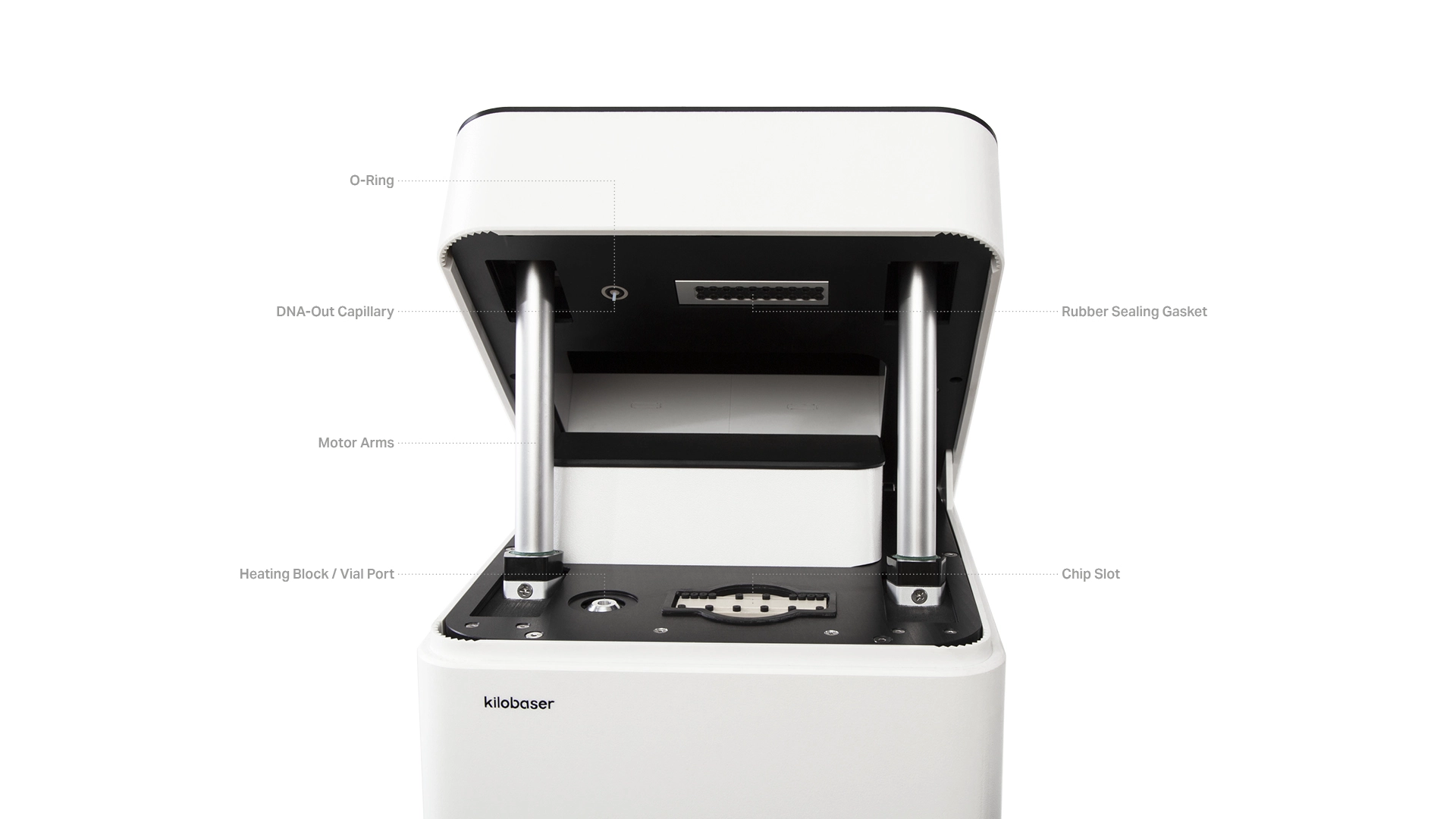
The lid and the cartridge move under motor control, not by hand. These answers give the Kilobaser permission to move; it will never move a motor without one. What each step involves is described in Inserting a chip, Inserting a vial and Exchanging a cartridge in Operation.
chipInsertConfirmed covers the vial as well as the chip — one question, two objects.
Forget the vial and the run does not stop cleanly; an error appears once the lid has
closed (1-2-12 or 1-2-13), and the same happens if the vial is left in at the end.
This is the honest limit of the API. A program can confirm that a chip is in, but it
cannot put one there. An unattended integration that answers chipInsertConfirmed for a
chip nobody inserted will produce a failed run and a wasted cartridge.
So the realistic pattern is a driver that runs while somebody is present: your code does the bookkeeping and the timing, a person does the handling. If nobody is there, queue the work and let them start it at the touchscreen.
 CAUTION
Do not answer these prompts on behalf of a person who is not there. Confirming that a
chip or a cartridge has been inserted when it has not will fail the run and consume the
consumables anyway. What each step involves is described in
Operation in the Kilobaser manual.
1.6 Two answers means a real question
Usually one answer is pending. When two are, the Kilobaser is not asking you to confirm two things — it is offering a choice. The interface shows this as a choice field, and it appears when an automated synthesis finishes:
confirmEndProcess— the interface's FINISH UP. Stop here; the vial and the used chip come out and the placeholder chip goes in.skipRemoveAndStartNextRun— the interface's START SYNTHESIS. Carry straight on into the next queued entry.
CAUTION
Continuing does not mean leaving the consumables alone. A chip cannot be reused, so the
vial has to come out of the heating block, the chip has to be exchanged and a new vial
inserted before the next run — the interface says so on screen. Sending this answer for a
run whose chip was never changed wastes the next oligo and the previous one's product.
Neither is a formality: both require somebody to open the lid and handle consumables.
NOTE
While the choice field is waiting, the lid stays closed and it is safe to leave the
Kilobaser in that state for a few hours, overnight included — as long as the gas supply
stays open. A driver that stops answering is therefore not an emergency. Turning the gas
off before the placeholder chip is in can contaminate the cartridge and sometimes the
whole device; see Operation.
A driver has to have a policy. kb_run_head.py takes it as a flag:
choice = finish_answer if finish_answer in pending else pending[0]
Anything that is not the choice it was configured for gets confirmed; the choice itself is made deliberately.
1.7 Following progress
While a run is working rather than waiting, the status carries:
| Field | Meaning |
|---|---|
currentProcessRunId |
which run is executing |
currentRemainingTime |
estimated time left, in milliseconds |
currentCheckpointProgress |
progress through the current step |
runInformations |
the expanded list of processes and where it has got to |
currentState.cartridge |
the installed cartridge, with bases remaining |
The Kilobaser shows the same information on screen. This card is from a run that was canceled, which is why it reads aborted; the progress line underneath is the step it had reached:
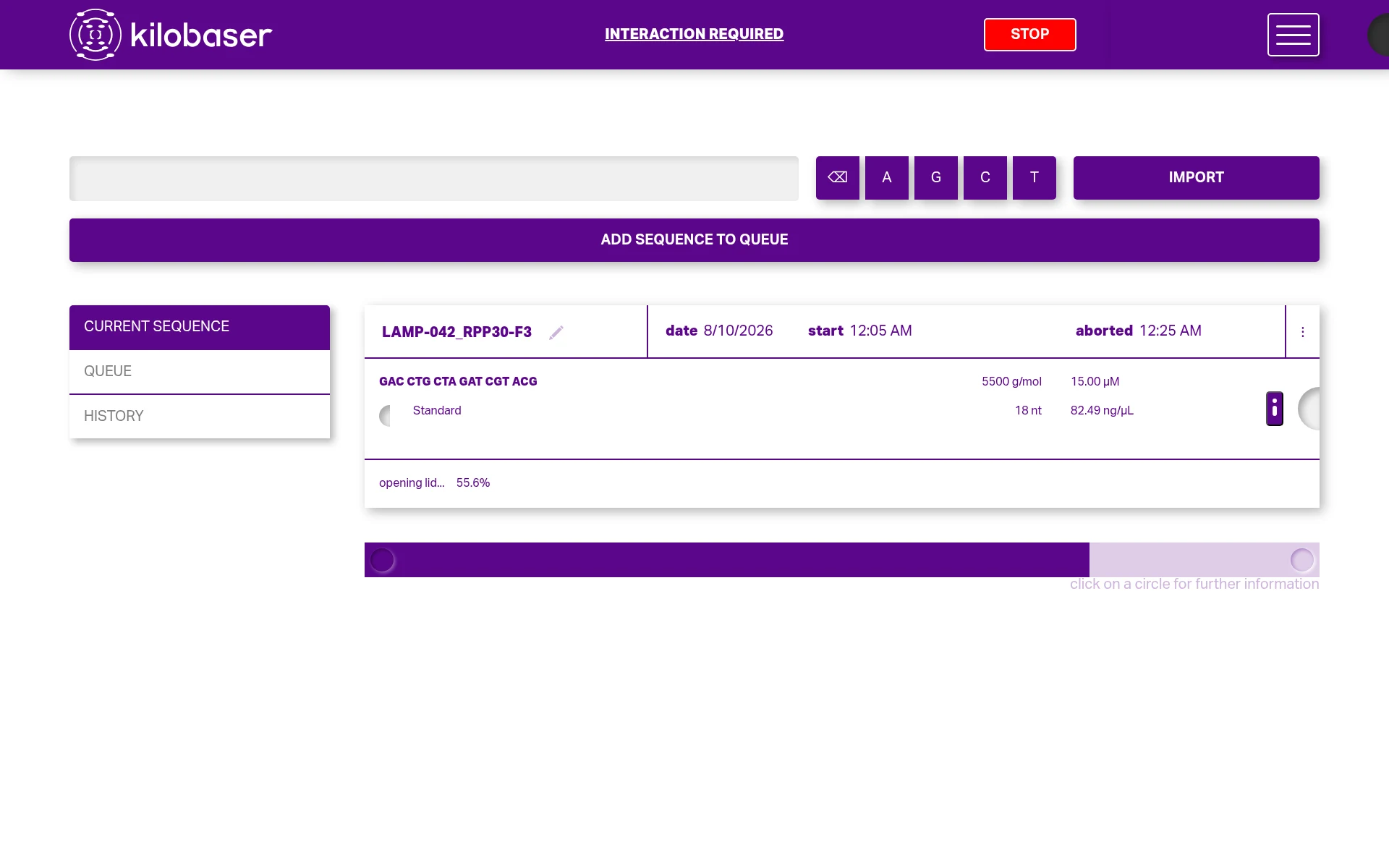
The percentage is currentCheckpointProgress against the step named beside it; the mass
and concentration are computed from the oligo yield settings, not measured.
Every duration in this API — currentRemainingTime, duration, durations — is an
integer count of milliseconds, not seconds and not a formatted string.
Two fields mislead if you read them as facts. finishedAt on a run that is still going is
a projection: it is set when the run starts, to the expected finish, and only becomes
real when the run actually ends. A run that started at 22:05 will happily report a
finishedAt four hours in the future. Check abortedAt and the machine's mode rather
than comparing finishedAt to the clock.
A synthesis takes hours. Show currentRemainingTime and leave it alone.
1.8 Recording the result
Once a run has started, PUT /api/processRuns/:id accepts title and metadata, and
this is the one place metadata sticks — on a queued entry it is discarded, because the
machine rebuilds queue entries whenever the queue changes.
The metadata fields are defined by the device, not by you. A run carries the schema it
was created with, so read the array off the run, fill in data, and put it back:
{
  "metadata": [
    {"id": "qubit", "name": "Qubit Concentration", "type": "number", "unit": "ng/µL", "data": "212"},
    {"id": "notes", "name": "Notes", "type": "multiline", "data": "LAMP-042, plate 7"}
  ]
}
For anything you need to match back to your own records, use title. It survives
everything and it is what appears on the Kilobaser's screen.
1.9 The whole loop
kb_run_head.py is this chapter as a working program: it starts the head of the queue, answers each checkpoint as it appears, follows the machine across the inserted processes, and stops if an error becomes active.
python3 kb_run_head.py --host kilobaser.lab.example.org --user apibot --insecure
starting 'LAMP-042_RPP30-F3' (2026-08-09T22:05:25Z-0be17442)
  the machine will run: insertChip -> cartridgeInit -> cartridgeActivate -> initializeSystem -> insertChip -> synthesis
  checkpoint ['placeholderInsertConfirmed'] -> answering 'placeholderInsertConfirmed'
It refuses to answer anything while an error is active, which is the correct instinct: see cancel and errors.