

1 Queue oligos
One oligo is one queue entry. There is no grouping construct — an assay is just several entries that you happen to submit together — so if you want them associated, put the association in their titles.
1.1 Queue one
curl --insecure -b cookies.txt \
  -X POST https://kilobaser.lab.example.org/api/processRuns/queue \
  -H 'Content-Type: application/json' \
  -d '{
    "title": "LAMP-042_RPP30-P",
    "processType": "synthesis",
    "cartridgeType": "3",
    "chipKind": "3-BHQ1",
    "answers": { "sequence": "AGCCTGACTTGCAAGGTCATGCTT" }
  }'
| Field | Required | Meaning |
|---|---|---|
answers.sequence |
yes | the sequence, 5' to 3', at least 8 bases and up to about 50 |
processType |
yes | synthesis for anything you are ordering |
cartridgeType |
yes | which cartridge, see synthesis model |
chipKind |
yes | which chip |
title |
no | free text, and the only durable label you control |
priority |
no | where in the queue; omit and it goes to the front |
Everything else on a queue entry is set by the machine.
title is worth using deliberately. It is what appears on the Kilobaser's screen, it
survives everything the machine does to the entry, and it is how you will match a queued
entry back to your own records. <assay>_<oligo> works well.
1.2 The response does not contain the id
The call answers 200 with your request echoed back, and no id. To find out what was created, read the queue afterwards:
curl --insecure -b cookies.txt https://kilobaser.lab.example.org/api/init | jq '.processRunQueue[] | {id, priority, title}'
{ "id": "2026-08-09T22:17:24Z-2f94c68c", "priority": 1, "title": "LAMP-042_RPP30-P" }
Match on title. If two clients submit at the same time this is racy, which is one more
reason to give titles that are unique to you.
kb_client.py wraps the whole dance:
entry = kb.queue_oligo("LAMP-042_RPP30-P", "AGCCTGACTTGCAAGGTCATGCTT",
                       cartridge_type="3", chip_kind="3-BHQ1")
print(entry["id"])
Reading the queue back is not only about the id. It is also how you learn the machine accepted and could plan the entry. The machine can also discard entries later, which is covered at the end of this chapter.
1.3 Queue many at once
For a set of oligos that share a cartridge and chip, send a FASTA file:
curl --insecure -b cookies.txt \
  -X POST https://kilobaser.lab.example.org/api/processRuns/queueImportBrowser \
  -H 'Content-Type: application/json' \
  -d '{
    "content": ">LAMP-042_RPP30-F3\nGACCTGCTAGATCGTACG\n>LAMP-042_RPP30-B3\nTTCAGGCATCGAACTGCA\n",
    "processRun": {
      "processType": "synthesis",
      "cartridgeType": "2",
      "chipKind": "2",
      "priority": 0
    }
  }'
Each record becomes an entry, and its header line becomes the title.
Three things to know:
One template applies to the whole file. The processRun object sets the cartridge and
chip for every record, so a mixed-modification assay needs one call per combination. That
is not a hardship — it is the grouping you wanted anyway, see
plan a batch.
The response is not JSON. It is a series of JSON objects written one after another with nothing between them, so a strict parser will reject it. Ignore the body and read the queue.
Order is not preserved. Six records submitted F3, B3, FIP, BIP, LF, LB came back in
the queue as LB, LF, BIP, FIP, B3, F3. This follows from the rule above: an entry with no
priority goes to the front, so each record displaces the one before it. Cards added at
the touchscreen are appended instead, in the order they are created. If the order matters,
set priority afterwards.
Sequence lines are stripped of anything that is not a letter, so wrapped FASTA is fine.
A letter the cartridge cannot make fails the whole call with 2-11-28, quoting the line.
1.4 Read the queue
GET /api/init returns the whole queue under processRunQueue, in the order the machine
will run it. There is also GET /api/processRuns/queue, but it pages at 15 and returns
storage order rather than run order, so prefer init.
Each entry carries processTypes, the steps the machine will actually perform for it:
priority  title                       cartridge  chip      steps
1         LAMP-042_RPP30-LB           2          2         insertChip -> synthesis
2         LAMP-042_RPP30-LF           2          2         insertChip -> synthesis
Read it before starting anything. It is where the machine tells you what your submission really costs.
The same queue on the Kilobaser's own screen, after the calls above:
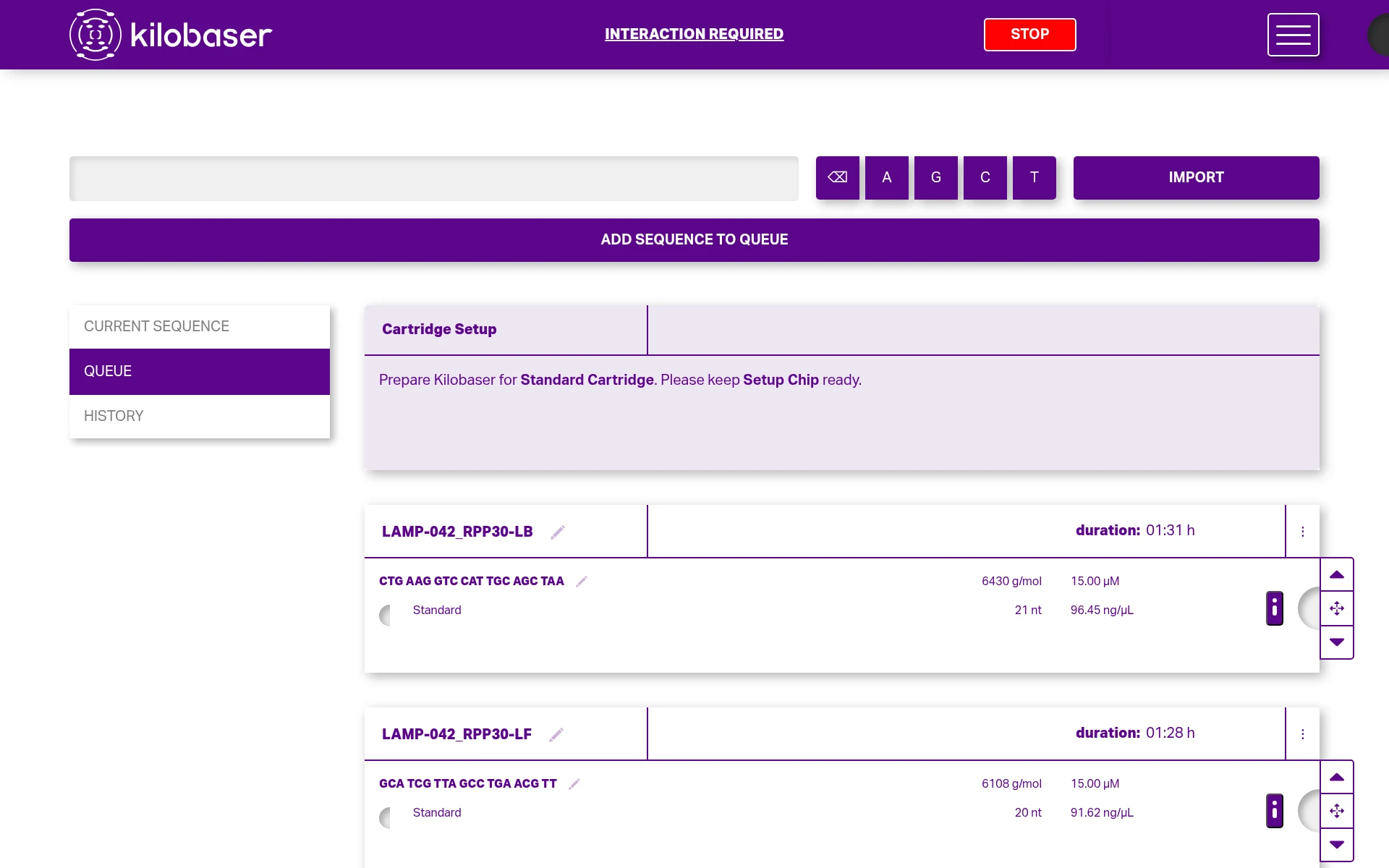
Entries submitted through the API are ordinary queue entries — the interface does not distinguish them.
It is worth knowing what the interface calls things, because your users will describe problems in its words rather than the API's:
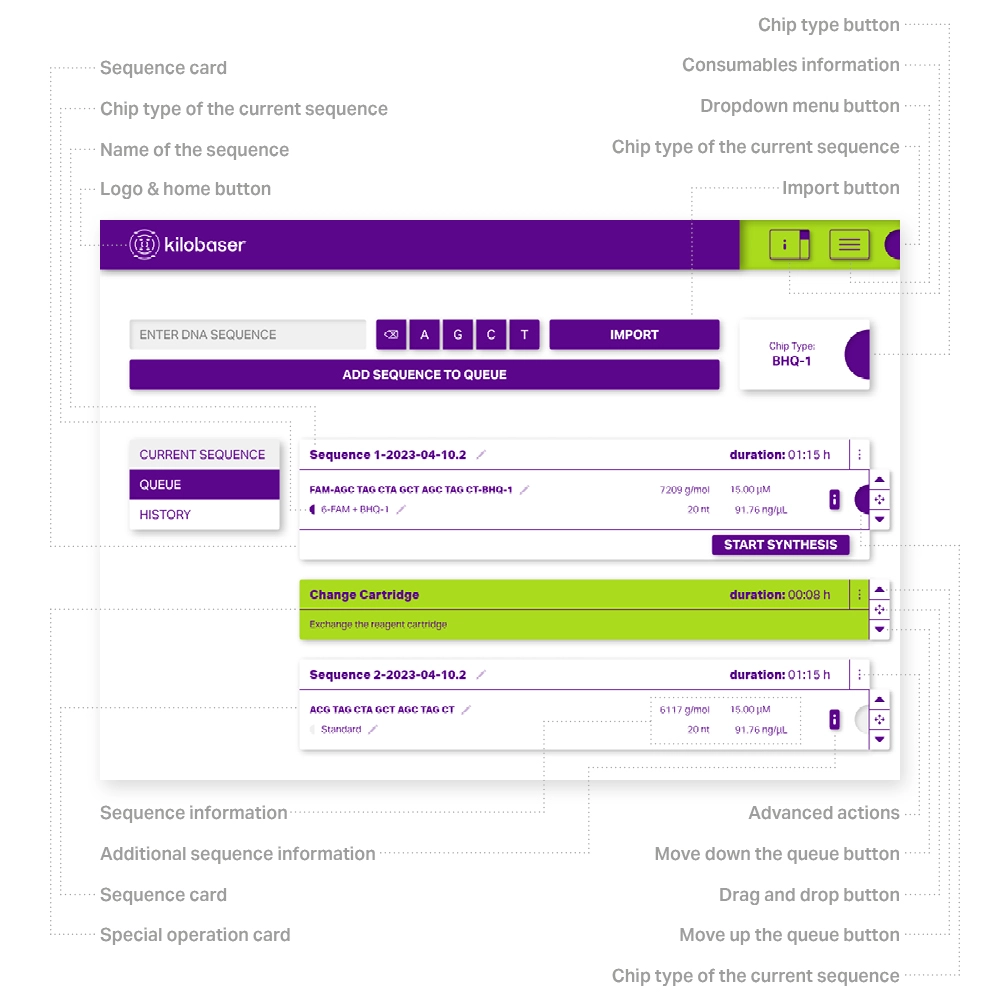
| The API calls it | The interface calls it |
|---|---|
| a queue entry | a sequence card |
| a step the machine inserted, such as a cartridge change | a special operation card |
chipKind |
the chip type |
title |
the name of the sequence |
priority |
the position, changed with the move up and move down buttons |
So the card above the oligo in the screenshot is a special operation card, added by the Kilobaser itself. It asks for the setup chip — a reusable chip shipped with the machine, used only while a cartridge is being set up, and not one of the single-use synthesis chips you order. Both kinds can be reordered and deleted the same way, from the interface or through the API.
1.5 Reorder edit and delete
Editing is a full replace, not a patch. The endpoint assigns answers,
cartridgeType, chipKind, title and metadata from whatever you send, so a field you
leave out is cleared rather than kept. Read the entry, change what you want, and send the
whole thing back:
curl --insecure -b cookies.txt \
  -X PUT https://kilobaser.lab.example.org/api/processRuns/queue/2026-08-09T22:17:24Z-2f94c68c \
  -H 'Content-Type: application/json' \
  -d '{ ...the entry you read, with priority changed to 99... }'
priority is a sort key, not a position: after any change the machine renumbers the whole
queue from 1. So set a high number to move something to the end and a low one to move it
to the front, then re-read to see where it actually landed. Editing also accepts
title, answers.sequence, cartridgeType and chipKind.
Deleting is what you expect:
curl --insecure -b cookies.txt \
  -X DELETE https://kilobaser.lab.example.org/api/processRuns/queue/2026-08-09T22:17:24Z-2f94c68c
Neither works on a run that has already started. To stop that, see cancel and errors.
1.6 The machine may discard entries
Every time the queue changes, the machine replans it against the state it expects to be
in. Entries it can no longer schedule are deleted, and nothing tells you directly —
they are simply not in the next processRunQueue event.
This is not usually arbitrary. An entry vanishes because the world moved: a cartridge was changed by hand, an earlier entry was deleted so a prerequisite disappeared, the machine was reset. But it does mean:
The queue you read is the truth, not the list of things you submitted. After
submitting a batch, read the queue back and compare. kb_queue_assay.py ends by doing
exactly that:
! the machine dropped: LAMP-042_RPP30-BIP
Do not keep a local list of "what I queued" and assume it is still accurate. Keep titles, read the queue.
1.7 Metadata
Queue entries carry a metadata array — but on a queued entry it does not persist.
Because the machine rebuilds every entry when the queue changes, anything you write there
is replaced by the device's own template at the next change. It sticks only once a run has
started, via PUT /api/processRuns/:id; see run lifecycle.
The fields are also defined by the device, not by you: a standard machine offers Qubit Concentration, Chip ID and Notes. It is not a place to put arbitrary keys.
For anything you need to survive from submission to collection, use title.
1.8 When it will not queue
| Code | Meaning |
|---|---|
2-11-12 |
sequence shorter than 8 bases |
2-11-11 |
sequence too long for that cartridge |
2-11-28 |
a letter the cartridge cannot make, with the line number |
2-11-20 |
that cartridge and chip cannot be used together |
2-11-18 |
the machine is in an emergency state |
2-11-20 reads "provided processType is invalid", which is misleading: your
processType is almost certainly fine and the cartridge and chip do not go together.
Check against ccSettings.operations before submitting — see
plan a batch.